Blog

  • Info Slide

    The info slide script is a great way to display your content to your customers! It will place a sliding text box over any image on the page. It can be placed inside of content or modules. It will also automatically adjust to any size screen size on window resize. See below for a demonstration.

    Example Slide

    This is dummy text. You can add any text or html markup here.

    Example Slide

    This is dummy text. You can add any text or html markup here.

    Example Slide

    This is dummy text. You can add any text or html markup here.

    Example Slide

    This is dummy text. You can add any text or html markup here.

    Example Slide

    This is dummy text. You can add any text or html markup here.

    Example Slide

    This is dummy text. You can add any text or html markup here.

    Example Slide

    This is dummy text. You can add any text or html markup here.

    Example Slide

    This is dummy text. You can add any text or html markup here.

    Example Slide

    This is dummy text. You can add any text or html markup here.

    I like what I see! I want to JOIN TODAY.
  • Optional Responsive Layout

    Responsive design at its most elementary definition is simply the use of css media queries and some javascript to rearrange a website’s layout to fit multiple screen sizes. This can range from a wide screen monitor down to the smallest of smart phones. It is done all through the same site, same installation, sharing the same files, and no extra layouts needed as in the past. Unlike many pixel grid based templates, Shape5 Vertex templates are already built on a fluid width layout based on percentages, with an optional pixel width wrapper, which is what responsive layouts require. Because of this Vertex templates do not require a responsive layout, instead is completely optional! That’s right, if you’re uncomfortable with responsive layouts or it won’t work with your site, then simply turn it off and use the standard fixed or fluid width layout instead!

    See It Live On Responsinator.com

    Open this website on responsinator.com to see its layout on multiple devices.

    What Makes The Vertex Responsive Layout The Best and Most Flexible?

    • The responsive layout is completely optional, don’t use it if you don’t want it!
    • Virtually no javascript. The only javascript used is for the mobile bar effects and to add responsive capabilities to IE7. We believe that javascript should only be used as a last resort.
    • Start with a fixed or fluid layout.
    • Optional IE7/8 responsive layout.
    • Very easy to understand layout, which allows you to setup your site with very little effort.
    • Fully customizable mobile bar styling.
    • Hide divs, modules and content easily with hide classes at specified screen sizes.
    • Wide screen support options.
    • Multiple options for fluid width images.
    • And much more!

    Easy To Understand Layout

    One of the biggest advantages to the Vertex Responsive Layout is that we start the layout as if it were designed for a desktop viewer, and then simply reduce, modify, or remove certain sections or font sizes based on the size of the user’s screen. This is all done through css media queries, and is all done automatically for you!

    The best way to see this approach, is simply resize your browser to see it all take effect.

    Some responsive designs simply use a series of floating divs that re-arrange themselves on the page and add columns as the screen width increases or decreases. The biggest con to this approach is it can become very confusing as to where your content will actually exist on any given screen; making it very hard to create a specific layout and confusing for a client; especially those with specific product and content placement needs.

    Our approach is much easier to understand. The site will always keep its core layout shown here. When the screen changes it will adjust as described below. The majority of rows and columns will not change their basic styling or positions until they reach the mobile version. Again, only minor adjustments are made on varying screen sizes so that you always know what your site will look like and where content will be placed!

    • If the column width option is enabled, the body is set to fluid, and the body width reaches 1300px the column sizes will increase by 30%. If it reaches 1900px they will increase by 60%. If it reaches 2500px they will increase by 90%. If you are using the max-body width calculations the column widths will be based off of this setting instead of screen width.
    • Between 971px and 1300px no changes will occur to the layout. This is the standard desktop view of the template.
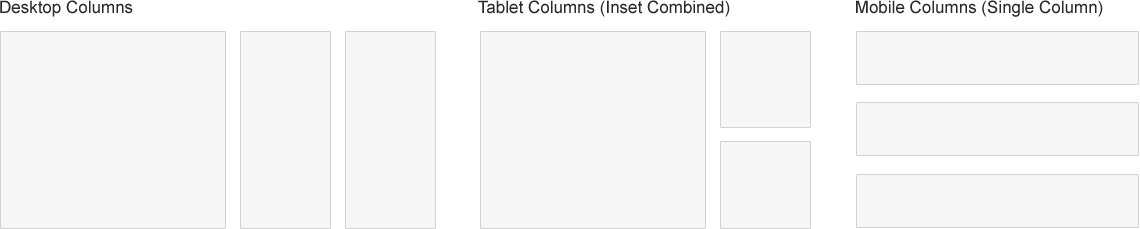
    • At 970px (a standard 10 inch tablet screen) the body width will become fluid and will fill most of the viewing area. If the inset columns are used on the page they will be combined into their adjacent columns to create one column to increase the center column’s available width.
    • At 750px (a standard 7 inch tablet screen) the mobile navigation bar will appear for easier navigation. If the column width option for small tablets is enabled you can set the center column to stay their original sizes, reduce the width by 20%, or stack into one column.
    • At 580px (a standard mobile device size) the entire body will become one single column and module stack on top of each other. Some adjustments to the header and footer will occur.

    Below are illustrations of the center columns only in the scenarios described above.
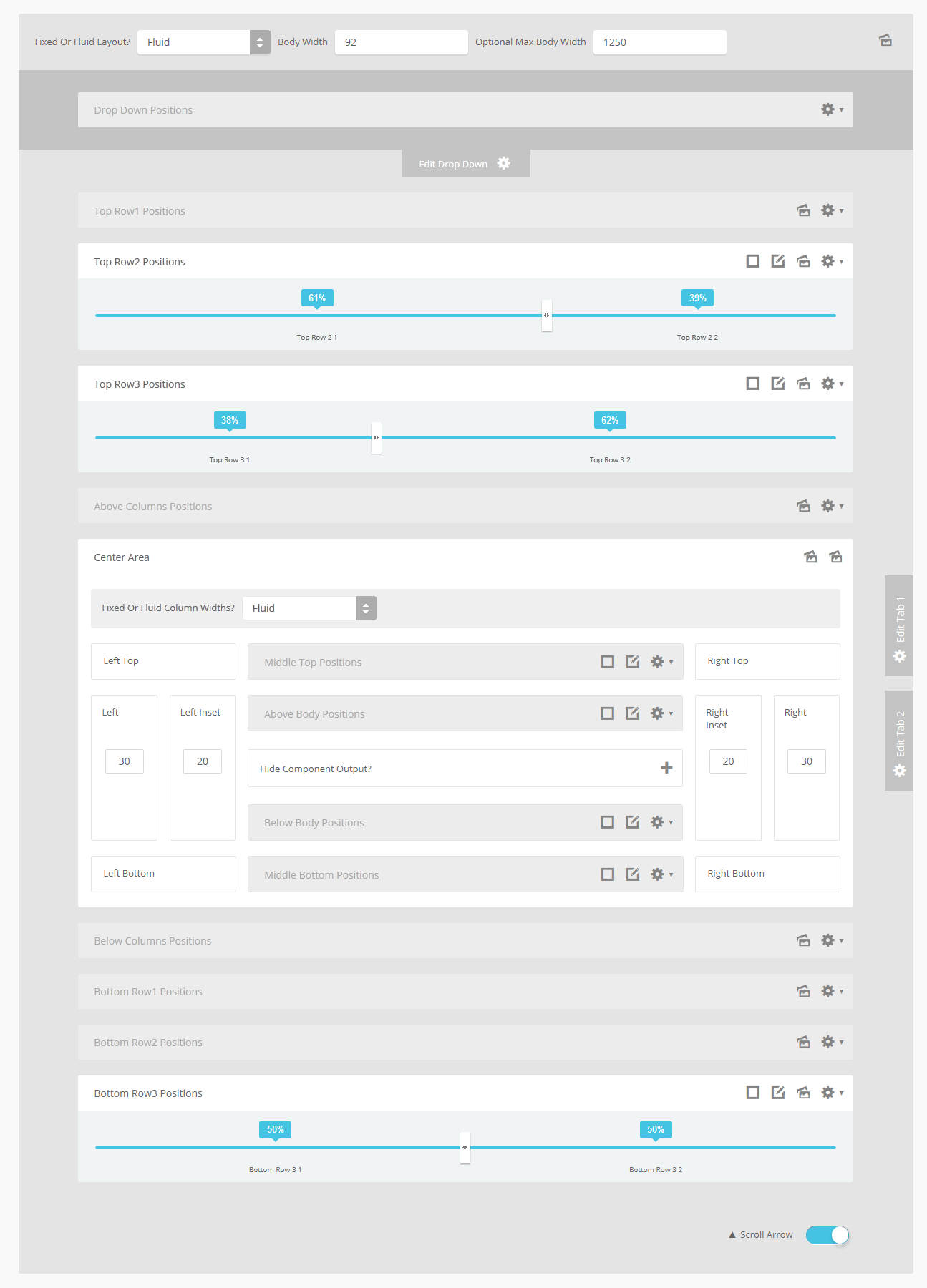
    Below you will find a screenshot of the responsive options available in the Vertex framework. Below that you will find documentation for each feature shown.
    General Layout

    The general layout options are the ones starting with Enable Font Resizer? and ending with Right Inset Width. These parameters are the core layout options that apply to all templates, whether responsive is enabled or not. Configuring this area is the first step in configuring a responsive layout. You can choose to set the site to either a fixed pixel width or fluid percentage width, the responsive layout will work with either option. If you are using the fluid width option we recommend enabling the Max Body Width option so that that your site does not go above the set pixels; this helps keep your site looking proportionate across very wide screen.

    Enable The Responsive Layout

    If you wish to use the responsive layout simply turn on the switch and the Vertex framework will take care of the rest! It’s really that simple! Notice there is a separate switch for IE7 and IE8. This browser does not support css media queries natively, which is what makes responsive layouts possible. In order to add this functionality the template must use javascript, which can affect the performance of a website. With this added javascript IE7 and IE8 will support the responsive layout, but we highly recommend leaving it turned off. Keep in mind that the primary target for responsive websites is tablet and mobile devices, where IE7 and IE8 do not exist.

    Hide Tablet and Mobile Divs

    One of the biggest obstacles to overcome when designing a responsive layout site is that not all content, images and extensions were designed to work with responsive layouts. That means that sometimes you need the ability to hide a specific element on only certain sized screens, so that something doesn’t break the site’s layout and everything looks proportionate. We’ve made that all possible and very easy to do for you with hiding classes! There are three main ways to hide content on different size screens, and they are documented here.

    Column Widths

    If you are designing your site for very wide screens as well as standard desktop screens, then consider enabling this feature. If the body width is set to fluid then the left, left_inset, left_top, left_bottom, right, right_inset, right_top, and right_bottom positions will increase their widths for larger screens to keep everything proportionate. If the body width reaches 1300px this size will increase by 30%. If it reaches 1900px it will increase by 60%. If it reaches 2500px it will increase by 90%. If you are using the max-body width calculations will be based off of this setting instead of screen width. The original widths are calculated in the general layout area.

    For smaller screens it is often hard to make all of your content fit in the main center columns. If the screen size reaches 750px you have the option to keep the widths of the center columns how they are, reduce them by 20%, or stack them on top of each other in a single column. This option is meant for 7 inch tablets and effects the main center columns only. At 580px all positions will become a single column for mobile devices.

    Mobile Bars

    When the screen size reaches 750px wide (anything smaller than a standard 10 inch tablet), a navigation bar will appear across the top of the site and the bottom. This bar replaces the main menu, login, register, and search, for easier user on mobile devices. In the configuration you can choose what to enable on these bars as well as change the colors and style however you would like.


    Mobile Links

    Even though this is a responsive layout and there is no separate layout page for mobile devices, that does not mean that your site’s viewers will understand this or even know what a responsive layout is. It has become a standard for websites that use a mobile layout to have a link to view the desktop view of the website, and this is what your site viewers will expect to see. This link simply turns off the responsive configuration using a cookie and calls the website like a standard desktop would when viewing in mobile. There is then a link to return back to the mobile view of the site presented.


    I like what I see! I want to JOIN TODAY.
  • The Vertex 2 Framework

    We are very excited and very proud to bring to you the new and improved Vertex 2 template framework! You can upgrade your existing V1 templates today with an easy to use patch file here.
    (more…)

  • Sample Content

    Integer varius tempor auctor. Etiam fringilla venenatis mollis. Duis ullamcorper massa eu sapien fringilla consequat. Aliquam nec ligula mi, quis tincidunt odio. Lorem ipsum dolor sit amet, consectetur adipiscing elit. Vestibulum rutrum dui eros. Praesent nec nibh diam.

    Proin augue risus, molestie at dictum quis, viverra non ipsum. Praesent lacus dui, euismod ut mollis vel, lacinia vel arcu. In commodo arcu vitae velit elementum a luctus nibh mattis. Ut vel turpis eros. Nam mattis velit sed nibh scelerisque in bibendum felis sodales. Vivamus ornare pellentesque pellentesque. Nullam dignissim semper quam nec mollis. In vel lacus lectus, ac tristique leo.

    Aenean venenatis egestas iaculis. Nullam consectetur condimentum dolor at bibendum. Nulla in enim quis ipsum pulvinar imperdiet vitae nec velit. Donec non urna quam. Aliquam congue magna nec risus iaculis posuere. Vivamus bibendum interdum molestie. Sed libero risus, varius eu dictum ac, pharetra ac elit. Curabitur a nibh id ipsum sagittis blandit. Morbi cursus commodo leo quis rhoncus. In nec purus magna, id porta enim. Donec pulvinar aliquet vulputate. Donec sit amet justo sit amet ipsum posuere imperdiet id sed magna.

    (more…)

  • Sample Content

    Integer varius tempor auctor. Etiam fringilla venenatis mollis. Duis ullamcorper massa eu sapien fringilla consequat. Aliquam nec ligula mi, quis tincidunt odio. Lorem ipsum dolor sit amet, consectetur adipiscing elit. Vestibulum rutrum dui eros. Praesent nec nibh diam.

    Proin augue risus, molestie at dictum quis, viverra non ipsum. Praesent lacus dui, euismod ut mollis vel, lacinia vel arcu. In commodo arcu vitae velit elementum a luctus nibh mattis. Ut vel turpis eros. Nam mattis velit sed nibh scelerisque in bibendum felis sodales. Vivamus ornare pellentesque pellentesque. Nullam dignissim semper quam nec mollis. In vel lacus lectus, ac tristique leo.

    Aenean venenatis egestas iaculis. Nullam consectetur condimentum dolor at bibendum. Nulla in enim quis ipsum pulvinar imperdiet vitae nec velit. Donec non urna quam. Aliquam congue magna nec risus iaculis posuere. Vivamus bibendum interdum molestie. Sed libero risus, varius eu dictum ac, pharetra ac elit. Curabitur a nibh id ipsum sagittis blandit. Morbi cursus commodo leo quis rhoncus. In nec purus magna, id porta enim. Donec pulvinar aliquet vulputate. Donec sit amet justo sit amet ipsum posuere imperdiet id sed magna.

    (more…)

  • Sample Content

    Integer varius tempor auctor. Etiam fringilla venenatis mollis. Duis ullamcorper massa eu sapien fringilla consequat. Aliquam nec ligula mi, quis tincidunt odio. Lorem ipsum dolor sit amet, consectetur adipiscing elit. Vestibulum rutrum dui eros. Praesent nec nibh diam.

    Proin augue risus, molestie at dictum quis, viverra non ipsum. Praesent lacus dui, euismod ut mollis vel, lacinia vel arcu. In commodo arcu vitae velit elementum a luctus nibh mattis. Ut vel turpis eros. Nam mattis velit sed nibh scelerisque in bibendum felis sodales. Vivamus ornare pellentesque pellentesque. Nullam dignissim semper quam nec mollis. In vel lacus lectus, ac tristique leo.

    Aenean venenatis egestas iaculis. Nullam consectetur condimentum dolor at bibendum. Nulla in enim quis ipsum pulvinar imperdiet vitae nec velit. Donec non urna quam. Aliquam congue magna nec risus iaculis posuere. Vivamus bibendum interdum molestie. Sed libero risus, varius eu dictum ac, pharetra ac elit. Curabitur a nibh id ipsum sagittis blandit. Morbi cursus commodo leo quis rhoncus. In nec purus magna, id porta enim. Donec pulvinar aliquet vulputate. Donec sit amet justo sit amet ipsum posuere imperdiet id sed magna.

    (more…)

  • Sample Content

    Integer varius tempor auctor. Etiam fringilla venenatis mollis. Duis ullamcorper massa eu sapien fringilla consequat. Aliquam nec ligula mi, quis tincidunt odio. Lorem ipsum dolor sit amet, consectetur adipiscing elit. Vestibulum rutrum dui eros. Praesent nec nibh diam.

    Proin augue risus, molestie at dictum quis, viverra non ipsum. Praesent lacus dui, euismod ut mollis vel, lacinia vel arcu. In commodo arcu vitae velit elementum a luctus nibh mattis. Ut vel turpis eros. Nam mattis velit sed nibh scelerisque in bibendum felis sodales. Vivamus ornare pellentesque pellentesque. Nullam dignissim semper quam nec mollis. In vel lacus lectus, ac tristique leo.

    Aenean venenatis egestas iaculis. Nullam consectetur condimentum dolor at bibendum. Nulla in enim quis ipsum pulvinar imperdiet vitae nec velit. Donec non urna quam. Aliquam congue magna nec risus iaculis posuere. Vivamus bibendum interdum molestie. Sed libero risus, varius eu dictum ac, pharetra ac elit. Curabitur a nibh id ipsum sagittis blandit. Morbi cursus commodo leo quis rhoncus. In nec purus magna, id porta enim. Donec pulvinar aliquet vulputate. Donec sit amet justo sit amet ipsum posuere imperdiet id sed magna.

    Sed ultricies condimentum augue, sed congue erat dapibus nec. Etiam quis tempor nibh. Vestibulum urna dui, sodales ut ornare vitae, porta non augue. Curabitur nunc ipsum, facilisis nec luctus blandit, luctus at sem. Vestibulum pharetra augue vitae orci mollis scelerisque. Quisque gravida diam vel mauris ultricies ac faucibus turpis volutpat. Maecenas augue elit, rutrum pharetra mattis ullamcorper, commodo varius enim. Phasellus dapibus mattis ipsum sit amet tincidunt. In hac habitasse platea dictumst. Sed nisi dolor, ullamcorper eget pretium molestie, commodo non dolor. Praesent volutpat aliquet neque ut bibendum. Pellentesque tincidunt tortor non ipsum venenatis ultricies.

    Proin at justo eu orci condimentum ornare sed pellentesque orci. Duis nec interdum massa. Proin porta semper enim, sit amet condimentum lorem interdum non. Etiam vel sodales tellus. Nullam vulputate luctus sapien, in feugiat arcu pulvinar vitae. Phasellus risus orci, posuere non fringilla nec, placerat sit amet mauris. Mauris a sem turpis, vitae hendrerit risus. Mauris suscipit, purus ac ornare elementum, enim dolor convallis mauris, sit amet convallis urna metus at leo. Curabitur eget nisl a risus suscipit auctor. Ut a ultrices lectus. Pellentesque sed justo magna. Donec congue mi id odio sodales tincidunt. Integer cursus leo in libero imperdiet ac pharetra tortor venenatis. In nec purus at justo adipiscing condimentum.

  • 3rd Party Component Compatibility

    This template is compatible with all the major 3rd party components available for Joomla. The following are just some of the ones available that work great with any Shape 5 template. A template itself should in no way hinder the functionality of a component. Although we haven't tested every single Joomla component available we can say quite confidently that this template will be compatible with any Joomla extension you use with it.


    And many more!

  • S5 Drop Down Panel

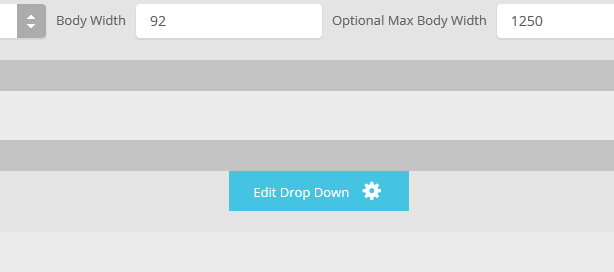
    The S5 Drop Down Panel is a slide down panel that can be demo'd at the top of this page. The panel itself contains six module positions. You may publish any module that you wish into these positions. It comes packed with features so be sure to check out the list and screenshot below.

    Note – If the responsive layout is enabled the drop down will disable when the screen size reaches 750px so that it does not interfere with the mobile menu bar

    • Customize almost everything! Shadows, borders, gradient, opacity
    • Contains 6 module positions drop_down_1, drop_down_2, drop_down_3, drop_down_4, drop_down_5 and drop_down_6
    • Auto adjust to the height of your content
    • Set your own open and close text
    • Auto collapse if no modules are published to it
    • And many more features!

    Screenshot of Drop Down admin in template configuration area:

  • Hide Article Component Area

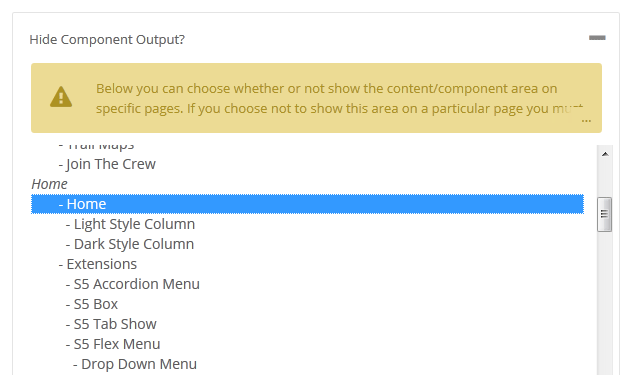
    Did you ever need to create a page where this is no article present or no component to be shown, and only load modules? This template makes it all possible! From the template configuration page you can hide the main content area on any page on the site.

    Below is a screenshot of this function from the configuration page, found under the General tab: